GroupDocs.Annotation MCP server at a glance

An MCP server that gives AI agents the GroupDocs.Annotation engine as tools they can call

Illustration annotation

Review comments inside the document

The agent reads the document, decides what deserves a comment and places highlights, underlines, arrows and notes where reviewers expect them. The result is an annotated file anyone can open, not a summary lost in the chat.

Local by design

Your AI client starts the server as a local process over stdio. It opens no ports, sends no telemetry, and reads and writes only the folder you configure, so contracts, records and internal documents never leave your machine.

Works with every MCP client

Use it from Claude Desktop, Claude Code, VS Code with GitHub Copilot, Visual Studio 2022, Cursor, Windsurf, Cline, JetBrains Rider and Codex CLI. One-click installs and ready-made configurations are available for each client.

Runs where your agent runs

GroupDocs.Annotation MCP server works on Windows, Linux and macOS, natively with .NET 10 or in Docker

VS Code
Docker
NuGet
Windows
Linux
macOS
Azure
Amazon

NuGet package

  • One command with the .NET 10 SDK, no install step
  • Windows, Linux and macOS
NuGet download

Docker image

  • Nothing to install besides Docker
  • linux/amd64 and linux/arm64, native dependencies bundled
Get the image

VS Code and GitHub Copilot

  • One-click install with a pre-filled configuration
  • Set your documents folder after install
Install in VS Code

Cursor

  • One-click install with a pre-filled configuration
  • Runs in evaluation mode until you add a license
Add to Cursor

Supported file formats

GroupDocs.Annotation MCP server works with the following file formats.

MS Office Formats

  • Word: DOCX, DOC, DOCM, DOT, DOTX, DOTM, RTF
  • Excel: XLSX, XLS, XLSM, XLSB, ODS
  • PowerPoint: PPT, PPTX, PPS, PPSX

Other Office Formats

  • Portable: PDF
  • OpenDocument: ODT, ODP
  • Diagram: VSD, VSDX

Other Formats

  • Images: BMP, JPEG, PNG, TIFF
  • CAD: DWG, DXF
  • Email: EML, EMLX

What the MCP server can do

Eleven tools cover the whole review cycle, from the first highlight to the last reply

Feature icon

Add any annotation type

The add_annotation tool places text fields, areas, points, arrows, highlights, underlines and strikeouts on any page.

Feature icon

List every comment

The get_annotations tool returns each annotation with its id, type, author, page and replies as JSON.

Feature icon

Edit and remove annotations

The update_annotation and remove_annotations tools change a message or position, or clear annotations by id.

Feature icon

Threaded review replies

The add_reply and remove_replies tools run a review conversation on any annotation, signed with a reviewer name.

Feature icon

See the annotated page

The generate_pages_preview tool renders pages as PNG, so the agent and you can check the result visually.

Feature icon

Export and import annotations

The export_annotations tool saves annotations as XML, and import_annotations merges them into another copy.

Feature icon

50+ document formats

Annotate PDF, Word, Excel, PowerPoint, images and more with one set of tools.

Feature icon

Document info first

The get_document_info tool reports file type, page count and page sizes, so annotations land in the right place.

Feature icon

Flexible licensing

Start in evaluation mode, then use a license file or metered keys. The get_license_status tool shows which one is active.

What you can ask your agent

Typical GroupDocs.Annotation MCP scenarios, each with the prompt that drives it

Annotate a contract in one prompt

Describe the review in plain language. The agent highlights, strikes out and comments in sequence, each step working on the file the previous one produced, and shows you the page at the end. Step by step: guide and blog walkthrough.

Prompt

Highlight the payment clause, then strike out the old delivery date,
then show me page 2

Run a review cycle with replies

Reviews are conversations. The agent lists open comments, finds the ones nobody answered and replies on your behalf, so the thread stays inside the document where the next reviewer will see it. Step by step: guide and blog walkthrough.

Prompt

List the annotations in contractA_annotated.pdf. Which ones have no replies?
Reply to Maria that finance approved the terms. Sign it as Alex.

Report on a finished review

Turn a stack of comments into a decision. The agent reads every annotation and reply and returns counts, authors and themes, or a page-by-page table. Step by step: guide and blog walkthrough.

Prompt

Summarize the review of contractA_annotated.pdf: how many comments,
from whom, and what the main themes are

Run on-premise with Docker

For regulated environments, run the server inside your perimeter. Mount the documents folder and the license, and pin the image version for change control. Architecture and security model: on-premise deployment.

docker-compose.yml

services:
  groupdocs-annotation:
    image: ghcr.io/groupdocs-annotation/annotation-net-mcp:26.9.0
    volumes:
      - "/srv/documents:/data"
      - "/srv/licenses:/license:ro"
    environment:
      GROUPDOCS_MCP_STORAGE_PATH: /data
      GROUPDOCS_LICENSE_PATH: /license/GroupDocs.Total.lic
    stdin_open: true

Install in your AI client

Copy the configuration for your client, or use the one-click links at the top of the page

Register the server

Every client starts the server the same way. Set GROUPDOCS_MCP_STORAGE_PATH to the folder with your documents, then restart the client. Leave GROUPDOCS_LICENSE_PATH empty for evaluation mode. Configurations for Visual Studio 2022, Windsurf, Cline, JetBrains Rider and Codex CLI are in the installation guide.
{
  "mcpServers": {
    "groupdocs-annotation": {
      "type": "stdio",
      "command": "dnx",
      "args": ["GroupDocs.Annotation.Mcp", "--yes"],
      "env": {
        "GROUPDOCS_MCP_STORAGE_PATH": "/path/to/documents",
        "GROUPDOCS_LICENSE_PATH": ""
      }
    }
  }
}
claude mcp add groupdocs-annotation \
  -e GROUPDOCS_MCP_STORAGE_PATH=/path/to/documents \
  -- dnx GroupDocs.Annotation.Mcp --yes
{
  "servers": {
    "groupdocs-annotation": {
      "type": "stdio",
      "command": "dnx",
      "args": ["GroupDocs.Annotation.Mcp", "--yes"],
      "env": {
        "GROUPDOCS_MCP_STORAGE_PATH": "/path/to/documents",
        "GROUPDOCS_LICENSE_PATH": ""
      }
    }
  }
}
{
  "mcpServers": {
    "groupdocs-annotation": {
      "command": "dnx",
      "args": ["GroupDocs.Annotation.Mcp", "--yes"],
      "env": {
        "GROUPDOCS_MCP_STORAGE_PATH": "/path/to/documents",
        "GROUPDOCS_LICENSE_PATH": ""
      }
    }
  }
}
docker run --rm -i \
  -v /path/to/documents:/data \
  ghcr.io/groupdocs-annotation/annotation-net-mcp:latest

Ready to get started?

Download GroupDocs.Annotation for free or get a trial license for full access!

Useful resources

Explore documentation, code samples, and community support to enhance your experience.

Temporary license tips

1
Sign up with your work email.
Free mail services are not allowed.
2
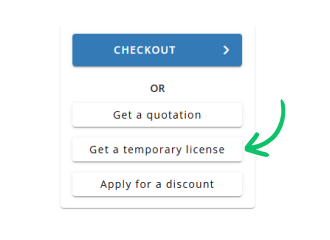
Use Get a temporary license button on the second step.
✕