GroupDocs.Assembly Overview

A Node.js library built for creating documents programmatically with integrated data handling.

Illustration assembly

Integrate Business Data into Templates with JavaScript

Generate polished reports by embedding JSON, XML, or other data into templates with GroupDocs.Assembly for Node.js via Java.

Manage Embedded Content

Automatically populate tables, charts, and other visuals in your documents using external data.

Customizable Options

GroupDocs.Assembly for Node.js via Java allows you to add features like barcodes, fetch data from URLs, and export files in various formats.

Platform independence

GroupDocs.Assembly for Node.js via Java integrates smoothly with leading operating systems, frameworks, and package managers.

Amazon
Docker
Azure
Eclipse
IntelliJ
Windows
Linux
Maven

Supported file formats

GroupDocs.Assembly for Node.js via Java supports a broad array of document formats.

Microsoft Office formats

  • Word: DOCX, DOC, DOCM, DOT, DOTX, DOTM, RTF, WordprocessingML
  • Excel: XLSX, XLS, XLSM, XLSB, XLTM, XLT, XLTM, XLTX, SpreadsheetML
  • PowerPoint: PPT, PPTX, PPTM, PPS, PPSX, PPSM, POTM, POTX

Images & Other Formats

  • Portable: PDF
  • Images: SVG, TIFF
  • Other office formats: ODT, OTT, OTS, ODS, ODP, OTP

Other formats

  • Web: HTML, MHTML
  • Emails: EML, MSG, EMLX
  • Other: EPUB, MD

Core Features of GroupDocs.Assembly

Create dynamic documents and reports with powerful data management tools.

Feature icon

Rich Data Visuals

Easily insert charts, tables, images, and lists into your documents with full customization.

Feature icon

Transform Your Data

Leverage tools like formulas and sorting to structure and display information effectively.

Feature icon

Wide Format Compatibility

Work seamlessly with popular file formats for templates and outputs.

Feature icon

Advanced Template Customization

Format templates with numeric, alphabetic, and other styling options.

Feature icon

Generate Barcodes Dynamically

Create and embed barcode images directly into your documents on demand.

Feature icon

Flexible Text Styling

Easily apply text styles like capitalization or title case in your templates.

Feature icon

Dynamic Content Insertion

Include content from external files dynamically during document generation.

Feature icon

Export to Various Formats

Save documents in multiple formats with your specified configurations.

Feature icon

Embed Media Dynamically

Insert images or other elements using Base64 data when creating documents.

Code samples

Discover practical examples of how to use GroupDocs.Assembly for common tasks.

Add a Bulleted List in Word Documents

See how to create bulleted lists in Word documents to organize data effectively. This example demonstrates how to generate a bulleted list using GroupDocs.Assembly.

Add a Bulleted List in Word Documents

// Insert this template on a document page:
// Managers' performance indicators
// . <<foreach [in products]>><<[ProductName]>>
// <</foreach>>

const assemblyLib = require('@groupdocs/groupdocs.assembly');

// Specify the template path
const template = "Bulleted List Template.docx";

// Set the output file path
const result = "Result Report.docx"

// Retrieve managers' data from a JSON source
const dataSource = new assemblyLib.JsonDataSource("Report data.json");
const data = new assemblyLib.DataSourceInfo(dataSource, "managers")

// Generate the report with the filled data
const assembler = new assemblyLib.DocumentAssembler();
assembler.assembleDocument(template, result, data);

Insert Pie Charts into PowerPoint

Learn how to use templates and XML to add pie charts in your presentations. Enhance your reports with pie charts to present data visually and clearly.

Insert Pie Charts into PowerPoint

// Add the chart title template to the presentation:
// Customers' revenue <<foreach [in customers]>> 
// <<x [CustomerName]>>

// Also include the chart data template:
// Total Order Price<<foreach [in customers]>> 
// <<x [CustomerName]>>

const assemblyLib = require('@groupdocs/groupdocs.assembly');

// Specify the chart template path
const template = "Pie Chart Template.pptx";

// Set the output file path
const result = "Result Report.pptx"

// Retrieve customers' data from an XML source
const dataSource = new assemblyLib.JsonDataSource("Chart data.xml");
const data = new assemblyLib.DataSourceInfo(dataSource, "customers")

// Generate the chart and save the result
const assembler = new assemblyLib.DocumentAssembler();
assembler.assembleDocument(template, result, data);

Ready to get started?

Download GroupDocs.Assembly for free or get a trial license for full access!

Useful resources

Explore documentation, code samples, and community support to enhance your experience.

Temporary license tips

1
Sign up with your work email.
Free mail services are not allowed.
2
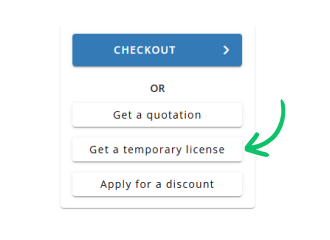
Use Get a temporary license button on the second step.
 English