GroupDocs.Comparison MCP server at a glance

An MCP server that gives AI agents the GroupDocs.Comparison engine as tools they can call

Illustration comparison

Exact diffs, explained in plain language

GroupDocs.Comparison finds every inserted, deleted and restyled passage. The agent turns that list into a summary, flags the clauses that matter and hands you a redlined file for legal or audit.

Local by design

Your AI client starts the server as a local process over stdio. It opens no ports, sends no telemetry, and reads and writes only the folder you configure, so contracts, records and internal documents never leave your machine.

Works with every MCP client

Use it from Claude Desktop, Claude Code, VS Code with GitHub Copilot, Visual Studio 2022, Cursor, Windsurf, Cline, JetBrains Rider and Codex CLI. One-click installs and ready-made configurations are available for each client.

Runs where your agent runs

GroupDocs.Comparison MCP server works on Windows, Linux and macOS, natively with .NET 10 or in Docker

VS Code
Docker
NuGet
Windows
Linux
macOS
Azure
Amazon

NuGet package

  • One command with the .NET 10 SDK, no install step
  • Windows, Linux and macOS
NuGet download

Docker image

  • Nothing to install besides Docker
  • linux/amd64 and linux/arm64, native dependencies bundled
Get the image

VS Code and GitHub Copilot

  • One-click install with a pre-filled configuration
  • Set your documents folder after install
Install in VS Code

Cursor

  • One-click install with a pre-filled configuration
  • Runs in evaluation mode until you add a license
Add to Cursor

Supported file formats

GroupDocs.Comparison MCP server works with the following file formats.

Microsoft Office & OpenDocument formats

  • Word: DOCX, DOC, DOCM,DOT, DOTM, DOTX, RTX, RTF, TXT
  • Excel: XLSX, XLS, XLT, XLTM, XLSB, XLSM
  • PowerPoint: PPTX, PPT, POT, POTX, PPS, PPSX
  • Outlook: EML, EMLX, MSG
  • OneNote: ONE
  • OpenDocument: ODT, ODP, OTP, ODS, OTT
  • Fixed Page Layout: PDF

Images, Graphics & Diagrams

  • Raster images: BMP, GIF, JPG, JPEG, PNG
  • Medical Imaging: DICOM
  • Microsoft Visio: VSDX, VSD, VSS, VST, VDX
  • AutoCAD Drawing: DWG, DXF

Other

  • Text: TXT
  • Programming Languages: CS, Java, CPP, JS, PY, RB, PL, ASM, GROOVY, JSON, PHP, SQL, LOG, DIFF, LESS, SCALA
  • Web: HTM, HTML, MHT, MHTML
  • e-Books: MOBI, DjVu
  • Delimiter-Separated Values: CSV

What the MCP server can do

Compare, analyze and explain document changes without uploading a single file

Feature icon

Redline two versions

The compare tool produces a marked-up result document with insertions, deletions and style changes highlighted.

Feature icon

Changes as data

The analyze_changes tool returns every change as structured JSON, so the agent can filter, count and summarize.

Feature icon

Text and style changes

Detects inserted and deleted text as well as formatting changes such as bold, color and font size.

Feature icon

Word, PDF, Excel, PowerPoint

Compare PDF, DOCX, XLSX, PPTX, ODT, RTF, TXT, HTML and 30+ more document formats.

Feature icon

Contract review

Ask the agent to flag every change that touches payment terms, liability or termination.

Feature icon

Whole folders of versions

Compare every v1 and v2 pair in a folder and report only the files that changed.

Feature icon

Password-protected files

Pass a password for the source, the target or both.

Feature icon

Check before comparing

The get_document_info tool returns file type, page count and page sizes without running a comparison.

Feature icon

Flexible licensing

Start in evaluation mode, then use a license file or metered keys. The get_license_status tool shows which one is active.

What you can ask your agent

Typical GroupDocs.Comparison MCP scenarios, each with the prompt that drives it

Review contract revisions

Legal review starts with what changed. The agent lists every change, flags the clauses that carry risk and produces the marked-up version you send to counsel. Step by step: guide and blog walkthrough.

Prompt

Compare contract-v1.docx with contract-v2.docx. List every change,
and flag anything touching payment terms, liability or termination

Summarize what changed

Not every comparison needs a redline. Ask for a short summary, only the deletions, or only the changes on one page, and the agent answers from the structured diff. Step by step: guide and blog walkthrough.

Prompt

What changed between proposal-draft.docx and proposal-final.docx? Keep it short.

Batch-compare a folder of versions

Point the agent at a folder of document pairs. It compares each pair, reports which ones changed and how, and produces marked-up copies only where you ask. Step by step: guide and blog walkthrough.

Prompt

For every -v1 and -v2 pair in my documents folder, compare the two
and tell me which invoices changed and how. One line per invoice.

Run on-premise with Docker

For regulated environments, run the server inside your perimeter. Mount the documents folder and the license, and pin the image version for change control. Architecture and security model: on-premise deployment.

docker-compose.yml

services:
  groupdocs-comparison:
    image: ghcr.io/groupdocs-comparison/comparison-net-mcp:26.9.1
    volumes:
      - "/srv/documents:/data"
      - "/srv/licenses:/license:ro"
    environment:
      GROUPDOCS_MCP_STORAGE_PATH: /data
      GROUPDOCS_LICENSE_PATH: /license/GroupDocs.Total.lic
    stdin_open: true

Install in your AI client

Copy the configuration for your client, or use the one-click links at the top of the page

Register the server

Every client starts the server the same way. Set GROUPDOCS_MCP_STORAGE_PATH to the folder with your documents, then restart the client. Leave GROUPDOCS_LICENSE_PATH empty for evaluation mode. Configurations for Visual Studio 2022, Windsurf, Cline, JetBrains Rider and Codex CLI are in the installation guide.
{
  "mcpServers": {
    "groupdocs-comparison": {
      "type": "stdio",
      "command": "dnx",
      "args": ["GroupDocs.Comparison.Mcp", "--yes"],
      "env": {
        "GROUPDOCS_MCP_STORAGE_PATH": "/path/to/documents",
        "GROUPDOCS_LICENSE_PATH": ""
      }
    }
  }
}
claude mcp add groupdocs-comparison \
  -e GROUPDOCS_MCP_STORAGE_PATH=/path/to/documents \
  -- dnx GroupDocs.Comparison.Mcp --yes
{
  "servers": {
    "groupdocs-comparison": {
      "type": "stdio",
      "command": "dnx",
      "args": ["GroupDocs.Comparison.Mcp", "--yes"],
      "env": {
        "GROUPDOCS_MCP_STORAGE_PATH": "/path/to/documents",
        "GROUPDOCS_LICENSE_PATH": ""
      }
    }
  }
}
{
  "mcpServers": {
    "groupdocs-comparison": {
      "command": "dnx",
      "args": ["GroupDocs.Comparison.Mcp", "--yes"],
      "env": {
        "GROUPDOCS_MCP_STORAGE_PATH": "/path/to/documents",
        "GROUPDOCS_LICENSE_PATH": ""
      }
    }
  }
}
docker run --rm -i \
  -v /path/to/documents:/data \
  ghcr.io/groupdocs-comparison/comparison-net-mcp:latest

Ready to get started?

Download GroupDocs.Comparison for free or get a trial license for full access!

Useful resources

Explore documentation, code samples, and community support to enhance your experience.

Temporary license tips

1
Sign up with your work email.
Free mail services are not allowed.
2
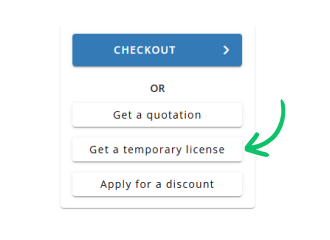
Use Get a temporary license button on the second step.
✕