GroupDocs.Conversion MCP server at a glance

An MCP server that gives AI agents the GroupDocs.Conversion engine as tools they can call

Illustration conversion

Your agent decides, the engine converts

The agent understands the request and picks the tool and the target format. GroupDocs.Conversion does the rendering, so layout, tables, fonts and images survive the conversion instead of being approximated by the model.

Local by design

Your AI client starts the server as a local process over stdio. It opens no ports, sends no telemetry, and reads and writes only the folder you configure, so contracts, records and internal documents never leave your machine.

Works with every MCP client

Use it from Claude Desktop, Claude Code, VS Code with GitHub Copilot, Visual Studio 2022, Cursor, Windsurf, Cline, JetBrains Rider and Codex CLI. One-click installs and ready-made configurations are available for each client.

Runs where your agent runs

GroupDocs.Conversion MCP server works on Windows, Linux and macOS, natively with .NET 10 or in Docker

VS Code
Docker
NuGet
Windows
Linux
macOS
Azure
Amazon

NuGet package

  • One command with the .NET 10 SDK, no install step
  • Windows, Linux and macOS
NuGet download

Docker image

  • Nothing to install besides Docker
  • linux/amd64 and linux/arm64, native dependencies bundled
Get the image

VS Code and GitHub Copilot

  • One-click install with a pre-filled configuration
  • Set your documents folder after install
Install in VS Code

Cursor

  • One-click install with a pre-filled configuration
  • Runs in evaluation mode until you add a license
Add to Cursor

Supported file formats

GroupDocs.Conversion MCP server works with the following file formats.

Document formats

  • Documents: PDF, XPS, TEX
  • Word: DOC, DOCX, DOCM, DOT, DOTX, DOTM, RTF, TXT
  • PowerPoint: PPT, PPTX, PPS, PPSX, ODP, OTP
  • Excel: XLS, XLSX, XLSM, XLSB, XLTM, XLTX, XLT, XLAM
  • Visio: VSDX, VSDM, VSSX, VSTX, VSTM, VSSM, VSX, VTX, VDX
  • OpenDocument: ODT, OTT, ODS

Images & Multimedia

  • Images: BMP, JPEG, PNG, GIF, TIFF, SVG, PS
  • Diagram: VSDX, DRAW, LUCIDCHART
  • CAD & GIS: DWG, DXF, DWF, IFC, SHP, KML, GEOJSON
  • Audio: MP3, WAV, FLAC, AAC, OGG
  • Video: MP4, AVI, MKV, MOV, WMV
  • 3D & Vector: SVG, AI, EPS, CDR, STL, OBJ, FBX, DAE, GLB

Other formats

  • eBook: EPUB, MOBI, AZW, FB2
  • Web: HTML, MHTML, MHT
  • Archives: ZIP, TAR, RAR, 7Z, BZ2, GZ
  • Email & Outlook: PST, OST, MSG, EML
  • Finance: QFX, OFX
  • OneNote: ONE

What the MCP server can do

Four tools give your agent the full conversion engine, from a single file to a whole folder

Feature icon

Convert any document

The convert tool turns PDF, Word, Excel, PowerPoint, HTML, images and 100+ other formats into the format you ask for.

Feature icon

Check the options first

The get_supported_formats tool lists every target format a document can be converted to.

Feature icon

Inspect documents

The get_document_info tool returns file type, page count and properties without converting anything.

Feature icon

LLM-ready Markdown

Turn PDF and Office files into Markdown for RAG pipelines, and turn Markdown back into Word or PDF.

Feature icon

Images and archival formats

Render PNG or JPG page previews and produce PDF/A for long-term archiving.

Feature icon

Protected documents

Pass a password in the prompt to convert encrypted source files.

Feature icon

A folder in one prompt

Ask for a whole folder and the agent converts every matching file locally, reporting failures per file.

Feature icon

On-premise and Docker

Run the server inside your network with Docker Compose and a license file, with no outbound traffic.

Feature icon

Flexible licensing

Start in evaluation mode, then use a license file or metered keys. The get_license_status tool shows which one is active.

What you can ask your agent

Typical GroupDocs.Conversion MCP scenarios, each with the prompt that drives it

Convert PDF to LLM-ready Markdown

Every RAG pipeline starts by turning documents into clean text. Ask the agent to convert a PDF to Markdown, and the server keeps headings, tables and lists so the output is ready for chunking and embedding. Step by step: guide and blog walkthrough.

Prompt

Convert report.pdf to Markdown

Batch-convert a whole folder

Point the server at a folder and describe the job once. The agent iterates over the files, the engine converts each one locally, and failures are reported per file. Step by step: guide and blog walkthrough.

Prompt

Convert every DOCX in my documents folder to PDF,
keep the originals and list any file that failed

Export agent-written Markdown to Word or PDF

Agents write in Markdown. Have the agent save its answer as a Markdown file and convert it into a polished PDF or DOCX deliverable in the same prompt. Step by step: guide and blog walkthrough.

Prompt

Save your analysis as analysis.md, then convert it to PDF

Run on-premise with Docker

For regulated environments, run the server inside your perimeter. Mount the documents folder and the license, and pin the image version for change control. Architecture and security model: on-premise deployment.

docker-compose.yml

services:
  groupdocs-conversion:
    image: ghcr.io/groupdocs-conversion/conversion-net-mcp:26.9.0
    volumes:
      - "/srv/documents:/data"
      - "/srv/licenses:/license:ro"
    environment:
      GROUPDOCS_MCP_STORAGE_PATH: /data
      GROUPDOCS_LICENSE_PATH: /license/GroupDocs.Total.lic
    stdin_open: true

Install in your AI client

Copy the configuration for your client, or use the one-click links at the top of the page

Register the server

Every client starts the server the same way. Set GROUPDOCS_MCP_STORAGE_PATH to the folder with your documents, then restart the client. Leave GROUPDOCS_LICENSE_PATH empty for evaluation mode. Configurations for Visual Studio 2022, Windsurf, Cline, JetBrains Rider and Codex CLI are in the installation guide.
{
  "mcpServers": {
    "groupdocs-conversion": {
      "type": "stdio",
      "command": "dnx",
      "args": ["GroupDocs.Conversion.Mcp", "--yes"],
      "env": {
        "GROUPDOCS_MCP_STORAGE_PATH": "/path/to/documents",
        "GROUPDOCS_LICENSE_PATH": ""
      }
    }
  }
}
claude mcp add groupdocs-conversion \
  -e GROUPDOCS_MCP_STORAGE_PATH=/path/to/documents \
  -- dnx GroupDocs.Conversion.Mcp --yes
{
  "servers": {
    "groupdocs-conversion": {
      "type": "stdio",
      "command": "dnx",
      "args": ["GroupDocs.Conversion.Mcp", "--yes"],
      "env": {
        "GROUPDOCS_MCP_STORAGE_PATH": "/path/to/documents",
        "GROUPDOCS_LICENSE_PATH": ""
      }
    }
  }
}
{
  "mcpServers": {
    "groupdocs-conversion": {
      "command": "dnx",
      "args": ["GroupDocs.Conversion.Mcp", "--yes"],
      "env": {
        "GROUPDOCS_MCP_STORAGE_PATH": "/path/to/documents",
        "GROUPDOCS_LICENSE_PATH": ""
      }
    }
  }
}
docker run --rm -i \
  -v /path/to/documents:/data \
  ghcr.io/groupdocs-conversion/conversion-net-mcp:latest

Ready to get started?

Download GroupDocs.Conversion for free or get a trial license for full access!

Useful resources

Explore documentation, code samples, and community support to enhance your experience.

Temporary license tips

1
Sign up with your work email.
Free mail services are not allowed.
2
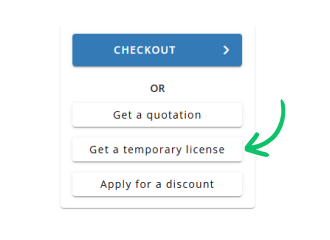
Use Get a temporary license button on the second step.
✕