GroupDocs.Total MCP server at a glance

An MCP server that gives AI agents the GroupDocs.Total engine as tools they can call

Illustration total

Every document skill in one server

Instead of registering a dozen servers, connect one. The agent chains conversion, comparison, signing, redaction and the rest inside a single conversation, with one license and one configuration.

Local by design

Your AI client starts the server as a local process over stdio. It opens no ports, sends no telemetry, and reads and writes only the folder you configure, so contracts, records and internal documents never leave your machine.

Works with every MCP client

Use it from Claude Desktop, Claude Code, VS Code with GitHub Copilot, Visual Studio 2022, Cursor, Windsurf, Cline, JetBrains Rider and Codex CLI. One-click installs and ready-made configurations are available for each client.

Runs where your agent runs

GroupDocs.Total MCP server runs in Docker on Windows, Linux and macOS, with every native dependency in the image

Docker
VS Code
Windows
Linux
macOS
Azure
Amazon

Docker image

  • Nothing to install besides Docker
  • linux/amd64 and linux/arm64, native dependencies bundled
Get the image

MCP Registry

  • Listed in the official MCP Registry
  • Discoverable by clients that browse the registry
View the listing

VS Code and GitHub Copilot

  • One-click install with a pre-filled configuration
  • Set your documents folder after install
Install in VS Code

Cursor

  • One-click install with a pre-filled configuration
  • Runs in evaluation mode until you add a license
Add to Cursor

Supported file formats

GroupDocs.Total MCP server works with the following file formats.

Microsoft Office, OpenDocument and text formats

  • Word: DOC, DOCX, DOCM, DOT, DOTX, DOTM, RTF, TXT
  • Excel: XLS, XLSX, XLSM, XLSB, XLTM, XLT, XLTM, XLTX
  • PowerPoint: PPT, PPTX, PPS, PPSX, PPSM, POT, POTM, POTX, PPTM
  • Project: MPP, MPT, MPX
  • Outlook: MSG, EML, EMLX, PST, OST
  • OneNote: ONE
  • OpenDocument: ODT, OTT, ODS, ODP, OTP, OTS, ODG
  • Fixed Page Layout: PDF, TEX, XPS, OXPS
  • e-Books: EPUB, MOBI, DjVu
  • Delimiter-Separated Values: CSV, TSV

Images, Graphics & Diagrams

  • Raster images: BMP, GIF, JPG, PNG, TIFF, WebP, DNG, DIB, Jpeg2000 family
  • Windows Icon: ICO
  • Scalable Vector Graphics: SVG, CDR, CMX, IGS, SVGZ
  • Adobe Photoshop: PSD, PSB
  • Stereo Lithography (3D Printing): STL
  • Medical Imaging: DICOM
  • Plotter Documents: PLT, HPG
  • Autodesk Design Web Formats: DWF, DWG
  • AutoCAD Drawing: DWT, IFC, STL, CF2

Other

  • Web: HTML, MHT, MHTML, XML
  • Metafile: WMF, EMF, CGM, EMZ, WMZ
  • Visio: VSD, VDX, VSS, VSSX, VSX, VST, VSTX, VTX, VSDX, VDW, VSTM, VSSM, VSDM
  • Project: MPP, MPT, MPX
  • PostScript: PS, EPS
  • Archives: ZIP, TAR, BZ2, GZ, RAR, RAR5
  • Other: VCF, VCARD, NUMBERS, NSF, OBJ
  • C/C++/C# Files: C, CC, C# , CPP, CXX, CS, H, HH, M, MM
  • Java/JavaScript Files: JAVA, JS, JSON, PROPERTIES

What the MCP server can do

39 tools from eleven GroupDocs engines, behind one MCP server

Feature icon

Convert and Markdown

Convert between PDF, Office, HTML, images and 50+ formats, and to or from Markdown.

Feature icon

Compare versions

Compare two documents and produce a marked-up diff.

Feature icon

Annotate and review

Add, list, update and reply to annotations, and export or import them as XML.

Feature icon

Sign and verify

Text, QR code, barcode and digital signatures, plus verification and search.

Feature icon

Redact sensitive data

Redact text by pattern, black out image areas and clean annotations and metadata.

Feature icon

Extract data

Extract text, tables, images, metadata and barcodes.

Feature icon

Merge and split

Combine up to four documents per call and split by page numbers.

Feature icon

Watermarks and metadata

Add, find and remove watermarks, and read or strip metadata.

Feature icon

Page previews

Render pages as images, so the agent can see what it produced.

What you can ask your agent

Typical GroupDocs.Total MCP scenarios, each with the prompt that drives it

Prepare a contract for sending

One prompt, several engines. The agent converts the draft, stamps it and removes personal data, each step working on the file the previous one produced.

Prompt

Convert contractA.docx to PDF, add a CONFIDENTIAL watermark,
then redact every email address

Review what changed and sign off

Compare two versions, read the changes, and sign the final one, without switching servers or tools.

Prompt

Compare contract-v1.docx with contract-v2.docx, summarize the changes,
then sign contract-v2 with a QR code reference

Clean a document before sharing

Strip what should not leave the company: metadata, comments and hidden text, then check the result visually.

Prompt

Remove all metadata and annotations from report.pdf,
then show me page 1 of the result

Run on-premise with Docker

For regulated environments, run the server inside your perimeter. Mount the documents folder and the license, and pin the image version for change control.

docker-compose.yml

services:
  groupdocs-total:
    image: ghcr.io/groupdocs-total/total-net-mcp:26.7.3
    volumes:
      - "/srv/documents:/data"
      - "/srv/licenses:/license:ro"
    environment:
      GROUPDOCS_MCP_STORAGE_PATH: /data
      GROUPDOCS_LICENSE_PATH: /license/GroupDocs.Total.lic
    stdin_open: true

Install in your AI client

Copy the configuration for your client, or use the one-click links at the top of the page

Register the server

Every client starts the same container. Mount the folder with your documents at /data, then restart the client. Add -e GROUPDOCS_LICENSE_PATH and a license mount to lift evaluation limits. More clients and options: installation guide.
{
  "mcpServers": {
    "groupdocs-total": {
      "command": "docker",
      "args": ["run", "--rm", "-i", "-v", "/path/to/documents:/data", "ghcr.io/groupdocs-total/total-net-mcp:latest"]
    }
  }
}
claude mcp add groupdocs-total -- \
  docker run --rm -i -v /path/to/documents:/data ghcr.io/groupdocs-total/total-net-mcp:latest
{
  "servers": {
    "groupdocs-total": {
      "type": "stdio",
      "command": "docker",
      "args": ["run", "--rm", "-i", "-v", "/path/to/documents:/data", "ghcr.io/groupdocs-total/total-net-mcp:latest"]
    }
  }
}
{
  "mcpServers": {
    "groupdocs-total": {
      "command": "docker",
      "args": ["run", "--rm", "-i", "-v", "/path/to/documents:/data", "ghcr.io/groupdocs-total/total-net-mcp:latest"]
    }
  }
}
docker run --rm -i \
  -v /path/to/documents:/data \
  ghcr.io/groupdocs-total/total-net-mcp:latest

Ready to get started?

Download GroupDocs.Total for free or get a trial license for full access!

Useful resources

Explore documentation, code samples, and community support to enhance your experience.

Temporary license tips

1
Sign up with your work email.
Free mail services are not allowed.
2
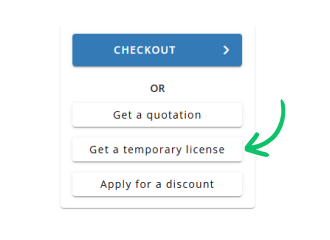
Use Get a temporary license button on the second step.
✕