GroupDocs Node.js SDK at a glance

Convert, merge, compare, sign, and redact popular document formats like PDF, Word, and Excel using one SDK package, see product overview for more details.

Illustration total

Combine the power of multiple GroupDocs packages into a single, enterprise-ready solution

GroupDocs.Total for Node.js via Java unites the capabilities of all major GroupDocs APIs—Conversion, Merger, Signature, and Comparison—into one integrated toolkit.

Automate complex workflows such as converting Word files to PDF, merging reports, applying secure digital signatures, or comparing contract versions—all in a single process.

This unified approach saves time, reduces development effort, and streamlines document management across your organization.

Master the diversity of file formats

Gain seamless compatibility with more than 200 file types including Word, Excel, PDF, PowerPoint, images, CAD drawings, and even email or code files. GroupDocs.Total ensures your solutions work flawlessly across virtually any format used in business environments.

Cross-platform and scalable by design

Deploy confidently on Windows, Linux, or macOS—anywhere Node.js and Java run. GroupDocs.Total’s Java-based engine delivers high performance and scalability for enterprise workloads, whether running on-premises, in containers, or in the cloud.

Platform independence

GroupDocs.Total for Node.js via Java supports the following operating systems, frameworks and package managers, see system requirements for more details.

Windows
macOS
Linux
NPM
Amazon
Docker
Azure
VS Code
IntelliJ

Supported file formats

GroupDocs.Total for Node.js via Java supports operations with the following file formats.

Microsoft Office, OpenDocument and text formats

  • Word: DOC, DOCX, DOCM, DOT, DOTX, DOTM, RTF, TXT
  • Excel: XLS, XLSX, XLSM, XLSB, XLTM, XLT, XLTM, XLTX
  • PowerPoint: PPT, PPTX, PPS, PPSX, PPSM, POT, POTM, POTX, PPTM
  • Project: MPP, MPT, MPX
  • Outlook: MSG, EML, EMLX, PST, OST
  • OneNote: ONE
  • OpenDocument: ODT, OTT, ODS, ODP, OTP, OTS, ODG
  • Fixed Page Layout: PDF, TEX, XPS, OXPS
  • e-Books: EPUB, MOBI, DjVu
  • Delimiter-Separated Values: CSV, TSV

Images, Graphics & Diagrams

  • Raster images: BMP, GIF, JPG, PNG, TIFF, WebP, DNG, DIB, Jpeg2000 family
  • Windows Icon: ICO
  • Scalable Vector Graphics: SVG, CDR, CMX, IGS, SVGZ
  • Adobe Photoshop: PSD, PSB
  • Stereo Lithography (3D Printing): STL
  • Medical Imaging: DICOM
  • Plotter Documents: PLT, HPG
  • Autodesk Design Web Formats: DWF, DWG
  • AutoCAD Drawing: DWT, IFC, STL, CF2

Other

  • Web: HTML, MHT, MHTML, XML
  • Metafile: WMF, EMF, CGM, EMZ, WMZ
  • Visio: VSD, VDX, VSS, VSSX, VSX, VST, VSTX, VTX, VSDX, VDW, VSTM, VSSM, VSDM
  • Project: MPP, MPT, MPX
  • PostScript: PS, EPS
  • Archives: ZIP, TAR, BZ2, GZ, RAR, RAR5
  • Other: VCF, VCARD, NUMBERS, NSF, OBJ
  • C/C++/C# Files: C, CC, C# , CPP, CXX, CS, H, HH, M, MM
  • Java/JavaScript Files: JAVA, JS, JSON, PROPERTIES

Key features

Comprehensive document processing — view, convert, compare, and manage PDFs and Office files at scale. Check out examples guide to learn how to integrate it into your applications.

Feature icon

Format conversion

High-fidelity conversion across hundreds of file types with layout, fonts and metadata preserved. Supports batch, streaming, and server-side workflows for production systems.

Feature icon

Secure file viewing

High-quality rendering for 180+ formats to HTML, PDF, PNG and JPEG. Embeddable viewer components for web and desktop with configurable access controls and paging.

Feature icon

Content comparison

Precise side-by-side and inline comparison that highlights content, formatting and layout changes and produces actionable change reports for review and audit.

Feature icon

Watermark control

Programmatic watermarking and extraction with support for text/image stamps, conditional application rules, and audit logging for compliance.

Feature icon

Metadata management

Robust read/write and normalization of metadata across formats, with bulk operations and policy-driven workflows to improve searchability and governance.

Feature icon

Document merger

Merge multiple documents (mixed types supported) into a single searchable output with page-level ordering, conflict resolution and output format options.

Feature icon

Template-based generation

Automated document creation from templates and external data (JSON, XML, databases), enabling repeatable, auditable reports and personalized documents at scale.

Feature icon

Text redaction

Accurate, irreversible redaction using regex, fuzzy matching and synonym-aware detection. Supports both visual redaction and removal from underlying document data.

Feature icon

Signature flexibility

Support for electronic and digital signatures (PKI), image/text stamps and verification workflows — integrateable into signing pipelines and audit trails.

Real-World Document Workflows

Practical scenarios demonstrating how to use GroupDocs in everyday document workflows.

Merge two DOCX files and convert the merged DOCX to PDF

Business need: Combine multiple source documents into a single, portable delivery (for example: intake forms, approvals, or assembly of contract sections) and produce a final PDF for distribution or archival.

Products used: GroupDocs.Merger + GroupDocs.Conversion

Outcome: Produces a single, print-ready and archiveable PDF with preserved layout and metadata — reducing manual assembly, simplifying review and ensuring consistent output for downstream systems.

JavaScript

const fs = require('fs');
const path = require('path');
const java = require('java');
const groupdocs = require('@groupdocs/groupdocs.total');

const PdfConvertOptions = java.import('com.groupdocs.conversion.options.convert.PdfConvertOptions');
const PdfOptions = java.import('com.groupdocs.conversion.options.convert.PdfOptions');
const PdfFormats = java.import('com.groupdocs.conversion.options.convert.PdfFormats');

// Apply license
const licensePath = path.resolve("./GroupDocs.Total.lic");
if (fs.existsSync(licensePath)) {
    groupdocs.License.setLicense(licensePath);
}

// Merge two DOCX files into a single document
const merger = new groupdocs.Merger("./part-a.docx");
merger.join("./part-b.docx");
merger.save("./output-merged.docx");
merger.dispose();

// Convert the merged DOCX to PDF (PDF/A-2b for archival compliance)
const converter = new groupdocs.Converter("./output-merged.docx");
const options = new PdfConvertOptions();
const pdfOptions = new PdfOptions();
pdfOptions.setPdfFormat(PdfFormats.PdfA_2B);
options.setPdfOptions(pdfOptions);
converter.convert("./final-delivery.pdf", options);
converter.close();

Extract text, thumbnails and metadata for indexing

Business need: Automatically extract searchable text, visual previews and structured metadata from ingested documents to power search, previews and content classification in an enterprise index.

Products used: GroupDocs.Viewer + GroupDocs.Metadata

Outcome: Enables faster document discovery and richer search UX (text + thumbnail + metadata), improves relevance and automates downstream workflows like tagging, routing or ML-based classification.

JavaScript

const fs = require('fs');
const path = require('path');
const java = require('java');
const groupdocs = require('@groupdocs/groupdocs.total');

const HtmlViewOptions = java.import('com.groupdocs.viewer.options.HtmlViewOptions');
const AnySpecification = java.import('com.groupdocs.metadata.search.AnySpecification');

// Apply license
const licensePath = path.resolve("./GroupDocs.Total.lic");
if (fs.existsSync(licensePath)) {
    groupdocs.License.setLicense(licensePath);
}

// Render the document pages to HTML for a preview
const viewer = new groupdocs.Viewer("bussiness-plan.docx");
viewer.view(HtmlViewOptions.forEmbeddedResources("p_{0}.html"));
viewer.close();

// Read metadata (title, author, custom properties)
const metadata = new groupdocs.Metadata("bussiness-plan.docx");
const props = metadata.findProperties(new AnySpecification());
const it = props.iterator();
while (it.hasNext()) {
    const prop = it.next();
    console.log(prop.getName(), String(prop.getValue()));
}
metadata.close();

Compare two versions of a business proposal, generate a change report, and redact personal information

Business need: Business proposals often go through multiple revisions. It’s important to quickly identify what has changed and remove sensitive contact details like names, emails, or phone numbers before sharing the document externally.

Products used: GroupDocs.Comparison + GroupDocs.Redaction

Outcome: The result is a clear change report highlighting all edits between proposal versions, with contact information securely redacted for safe and compliant distribution.

JavaScript

const fs = require('fs');
const path = require('path');
const java = require('java');
const groupdocs = require('@groupdocs/groupdocs.total');

const SaveOptions = java.import('com.groupdocs.redaction.options.SaveOptions');
const ReplacementOptions = java.import('com.groupdocs.redaction.redactions.ReplacementOptions');
const RegexRedaction = java.import('com.groupdocs.redaction.redactions.RegexRedaction');

// Apply license
const licensePath = path.resolve("./GroupDocs.Total.lic");
if (fs.existsSync(licensePath)) {
    groupdocs.License.setLicense(licensePath);
}

// Compare two versions of the document
const comparer = new groupdocs.Comparer("./proposal_v1.docx");
comparer.add("./proposal_v2.docx");
comparer.compare("./proposal_diffs.docx");
comparer.close();

// Define patterns to redact personal and company information
const replacementOptions = new ReplacementOptions("[REDACTED]");
const phonePattern = String.raw`\b(?:\+?1[-.\s]?)?(?:\(?\d{3}\)?[-.\s]?)\d{3}[-.\s]?\d{4}\b`;
const emailPattern = String.raw`[A-Za-z0-9._%+-]+@[A-Za-z0-9.-]+\.[A-Za-z]{2,}`;

// Define redactions to apply
const redactions = [
    new RegexRedaction(emailPattern, replacementOptions),
    new RegexRedaction(phonePattern, replacementOptions),
];

// Apply redactions to the document
const redactor = new groupdocs.Redactor("./proposal_diffs.docx");
for (const redaction of redactions) {
    redactor.apply(redaction);
}

// Set save options to keep the source file format
const saveOptions = new SaveOptions();
saveOptions.setAddSuffix(true);
saveOptions.setRasterizeToPDF(false);
saveOptions.setRedactedFileSuffix("redacted");

// Save the redacted document
redactor.save(saveOptions);
redactor.close();

Ready to get started?

Download GroupDocs.Total for free or get a trial license for full access!

Useful resources

Explore documentation, code samples, and community support to enhance your experience.

Temporary license tips

1
Sign up with your work email.
Free mail services are not allowed.
2
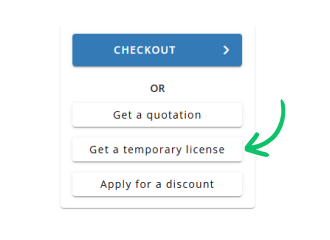
Use Get a temporary license button on the second step.
✕
 English